How Custom Indexing works
Published: Jun 01, 2026
Updated: Jun 01, 2026
Custom Indexing lets you take a market index, customize it to match your strategy, and own every position in fractional shares—all inside a dedicated Custom Indexing account.
Here's everything you need to know about how it works, from setup to ongoing management.
Quick start guide to Custom Indexing:
Open a Custom Indexing-specific account:
Choose from TFSA, RRSP, FHSA, or Cash account. This account can only be used for your Custom Index, and can’t hold any additional, separate stocks or ETFs.
Choose from three starting points
Start from a template—broad-market US index or a thematic index built by the Canadian finance community
Start from scratch and pick every holding yourself
Build with your chosen AI partner through Questrade MCP.
Customize it:
Adjust sectors, change stock weights, add or remove positions entirely. Any fractional security can be part of your index, letting you make one that reflects your strategy.
Fund your account:
Add funds via e-transfer, instant deposit, or set up a pre-authorized deposit for recurring contributions.
Buy in:
Once your account is funded, you’re ready to execute. You’ll need to fund at least $10 for your order to go through, and fractional shares will distribute your funds across every position in your index.
Setting up your Custom Index in detail
Opening a Custom Indexing account
Custom Indexing uses a dedicated account so that features like one-click rebalancing and drift notifications work accurately across all your holdings. This keeps your index self-contained—your other investments won't be affected when you rebalance, and your index performance stays clean. You can’t apply a Custom Index to a pre-existing Questrade account.
You can open a Custom Indexing account the same way you would open a regular Questrade account. Once you select your account type (TFSA, RRSP, FHSA, or Cash), you’ll be presented with a screen that asks what you would like to use the new account for, of which there is an option to select Custom Indexing.
Once open, the account functions like any registered or Cash account for tax purposes, but it's built specifically to hold and manage a Custom Index.
Each Custom Indexing account can be linked to one index you customize. Once it’s linked, you can still edit it anytime you want.
If you want to run multiple indices, you can, but you'll need a separate Custom Indexing account for each.
Choosing your starting point
Build your index your way with a template, build from scratch, or with AI.
The template library includes broad-market indices, as well as thematic indexes and ones created by Canadian finance creators. You can browse templates, see performance data, and compare approaches from the template library before choosing one. Once you select a template, it becomes your starting point. You can keep it as is or customize it before buying in.
If you prefer to build it yourself, you can also start from scratch. You’ll open an empty index and choose every security in it, then set the weight of each stock and sector.
The third way to start is through Claude. Connect your Questrade account through the Questrade MCP and describe the index you want. Claude builds it in the chat for your review and approval before it launches. For more details, please see: how to connect your Questrade account to AI.
Customizing your index
Customization happens at the stock and sector level. You can:
Increase or decrease the weight of specific sectors (for example, reduce your tech exposure or increase the influence of consumer goods)
Add or remove individual fractional-eligible Canadian or US securities not already in your template
Adjust the weighting of individual holdings
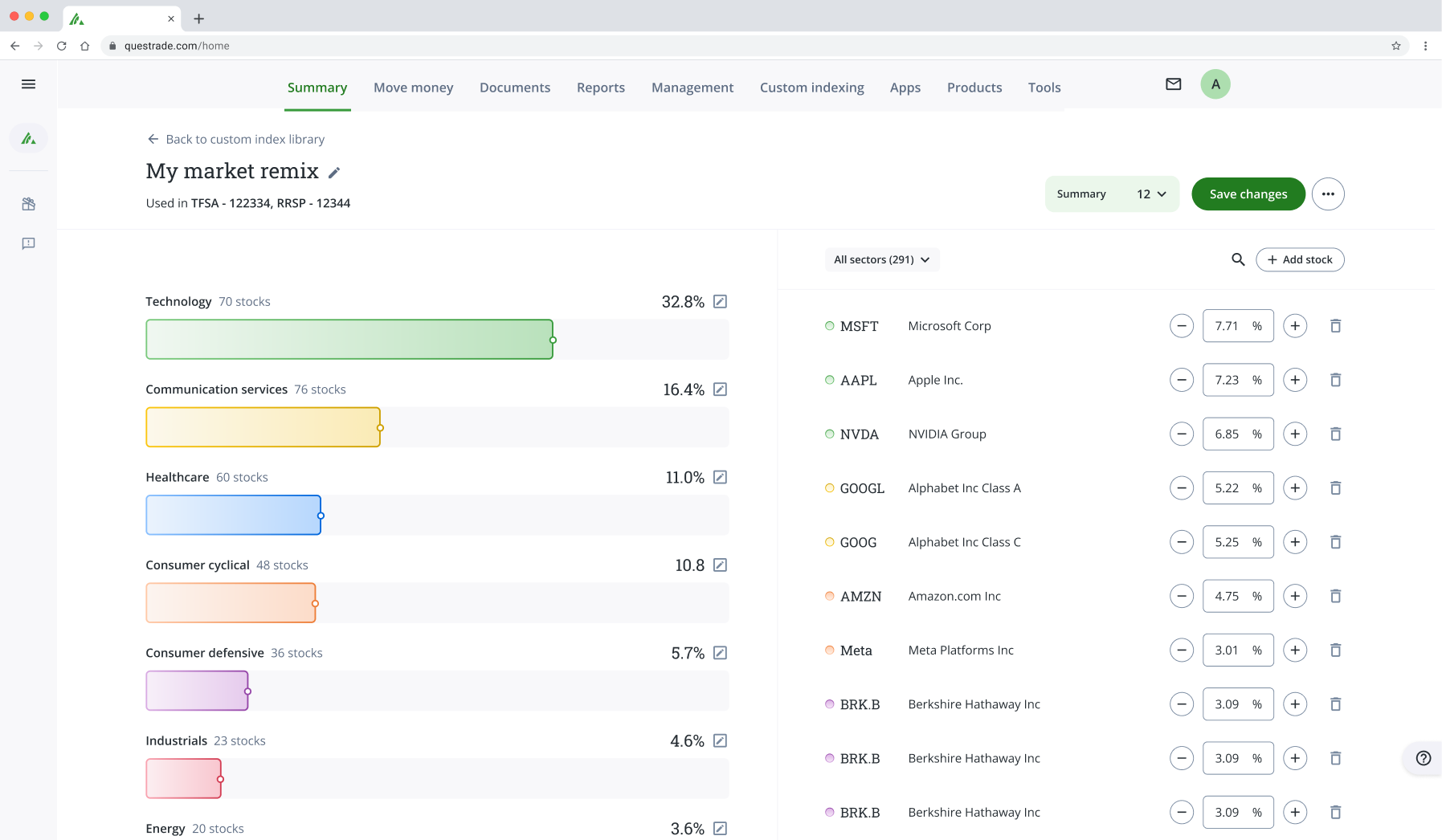
Your edits scale across the entire index. When you change a sector weight, every stock within that sector adjusts proportionally.
You don’t need to customize anything to get started. If a template already matches your strategy, you can copy it and invest in it as is.
Funding and buying in
Funding. Once your account is open, add funds via e-transfer, instant deposit, bill pay or a pre-authorized deposit (PAD) for recurring contributions.
Buying. When your funds are available, you have to buy into your index. This doesn’t happen automatically because you have full control over when to deploy the funds from your account into your index. All you have to do is hit “Send orders to invest” and every trade will be made.
The minimum amount needed to invest in a Custom Index is $10 CAD.
Custom Indexing uses fractional shares, so your funds are distributed across every position in your index according to your target weights—even if individual stocks trade at prices well above your deposit amount.
Managing your index
Editing your index after buying in
Your index isn't locked once you invest. You can edit it at any time—adjusting weights, adding or removing stocks and sectors—the same way you did during setup.
When you're done editing, you can apply the changes to your portfolio in one click. This will generate the buy and sell orders needed to bring your holdings in line with your updated index.
Rebalancing your index
As markets move, some holdings grow faster than others. When this happens, your portfolio gradually drifts from the weights you set.
Custom Indexing is designed to make correcting this drift easy. As soon as that drift exceeds 10%, you'll receive a push notification letting you know your index is off balance.
When you log in, an order summary will be ready for you—showing exactly what needs to be bought and sold to bring everything back in line.
Confirm the orders in one click, and Custom Indexing handles the rest, even across hundreds of positions.
Setting up dividend automation
You control how dividends are handled. For each index you create, you can choose to:
Automatically reinvest dividends back into the index
Receive dividends as cash in your account
Running multiple indices
There's no limit to how many Custom Indices you can create.
If you want to run different strategies (for example: one for long-term growth, one for sector-specific exposure, one that has more volatility) you can build a separate index for each.
Each index requires its own Custom Indexing account. The funds in each account can only be applied towards the single index linked to that account.
Selling what’s in your index
You’re never locked into the index you have and can sell it at anytime, just like an individual stock or ETF.
To sell at the index-level: Tap the sell button and select how much of your index you want to liquidate.
To sell at the security-level: To fully sell a security, delete it from your index and hit sell or rebalance to exit that position.
Managing Taxes
If simplicity at tax time matters to you, a registered Custom Indexing account is the most straightforward option. In a non-registered cash account, each rebalance can trigger sells across hundreds of positions, and every one is a separate taxable event with its own adjusted cost base (ACB) calculation—the running average cost of acquiring each security, which determines your capital gain or loss when you sell.
We're building features to simplify ACB tracking and tax reporting for all Questrade accounts ahead of next tax season, and exploring additional ways to make tax filing easier.
Are there really no Custom Indexing fees?
Yes, our goal is to make high-performance self-directed investing as accessible as possible. That means removing fees that get in the way of your profits.
Opening a Custom Indexing account is completely free, as is customizing your index.
Buying in and maintaining your index will not cost you any portfolio management fees or trading commissions either.
The only potential fees to be aware of are FX conversion fees and ETF MERs if you decide to add an ETF to your Custom Index.
Tip: You can cut your FX fees significantly by trading in USD—either by converting currency with Norbert’s Gambit, or by depositing USD to trade with (all Questrade accounts are dual-currency eligible by default; no charge, no criteria).