Manual bill payments
Published: Jun 21, 2026
This is a test at 8:40pm
Learn how to fund your account with an manual bill payment.
Bill payments are one of the most popular funding methods, and our recommended method for sending Canadian dollar cash to your Questrade accounts.
Bill payments are also completely free, and a simple way to send funds to Questrade.
These payments can be set up in under 5 minutes with every financial institution in Canada, and many banks will also allow you to ‘automate’ your bill payments if you’d like to set up regular, recurring deposits.
Bill payments however, are only available for Canadian dollars. For U.S. Dollar deposits, please choose from one of our other funding methods. We recommend using a Pre-authorized deposit (PAD).
Please see below for processing times, instructions and additional details:


Processing time
Most bill payments are processed by your bank or credit union and typically arrive at Questrade within 1-2 business days.
In some rare cases for smaller credit unions, or during bank holidays, this can take up to 4 business days.
For a brand-new Questrade account, please add 1-2 business days for us to ‘activate’ your account and set up your access for trading.
Third party deposits
Canada’s anti-money laundering legislation prevents Questrade from accepting deposits where the name on a bank account does not match the name on your Questrade account exactly.
Please ensure your first and last name listed in your Questrade profile (opens in a new tab) ‘match’ what is on file with your bank or credit union, before you make your first deposit. Otherwise this can lead to delays with accessing your funds.
You can learn more about third party deposits below.
How to make a bill payment
Follow these easy steps to set up your bill payment:
Log into your online banking
The name of the primary account holder on your bank account must match the name on your Questrade account. Otherwise, your deposit will be held until further action. Learn more
Add Questrade as a new bill payee
You can find this under the “Bill payments” or “Pay a bill” section in your bank account.
Depending on your financial institution, Questrade can be listed as: “Questrade Inc”, “Questrade Online Brokerage”, or “Questrade”.
You can also add a ‘nickname’ for the payee at many institutions, this can be helpful if you have multiple Questrade accounts.
Please do not use the payee named “Questrade currency exchange”, that is for corporate FX accounts only.
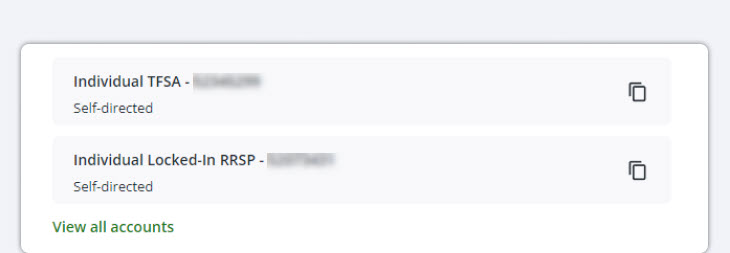
Once you’ve added Questrade as the payee, add your Questrade account number. You can copy and paste your account number by going to the Deposit page under the Move money page on your platform (shown below).
Tip: It’s always a good idea to consult with experts before making large investment decisions.
Accountants, tax planners and financial advisers may be able to assist you with questions about structuring your account(s) to minimize your tax liabilities and maximize your investment potential.
Opening a corporate investment account with Questrade can be done almost completely online, and we’re also here to help. Our corporate accounts are available in both margin and cash accounts.
Don’t hesitate to contact our New Accounts team via chat, at 1.888.783.7866, or via email at [email protected] for more assistance.
Tip: Almost all documents can also be e-signed (with the exception of AB Personal Guarantees, and all Entity-IRS Treaty Statements which must be hand-signed).
If you e-sign your account documents, they can only be accepted if they are uploaded to your account directly (please do not email e-signed documents as they cannot be accepted).
If you choose to email your account documents, they must be hand-signed.
Depending on your corporation’s structure, various roles can be assigned within the account:
Medical Corporations (among others) often have long formal corporation names. If this applies to you, you may encounter issues with the character limit in the online application.
Please feel free to shorten “Medical Professional Corporation” to “MPC” in your online application to meet the character limits. Alternatively, fill in as much as you can, then contact our New Accounts team directly before signing any documents.
Note: We will require a copy of the Articles of Incorporation to update the corporation’s name on record.
When applying for a corporate investment account, please keep the following in mind:
Corporate account applications can be complex, but we’re here to help.
Complete the form below and a member of our New Accounts team will reach out to guide you through every step of the corporate application process answering your questions along the way.
Note: The information in this blog is for educational purposes only and should not be used or construed as financial or investment advice by any individual. Information obtained from third parties is believed to be reliable, but no representations or warranty, expressed or implied, is made by Questrade, Inc., its affiliates or any other person to its accuracy.