Questrade Edge Web watchlists
Published: Oct 17, 2022
Updated: Feb 07, 2024
Discover how to create and edit watchlists with Questrade Edge Web.
Creating and editing watchlists on Questrade Edge Web is easy and customizable. Track the stocks, ETFs, or other securities that are most important to you.
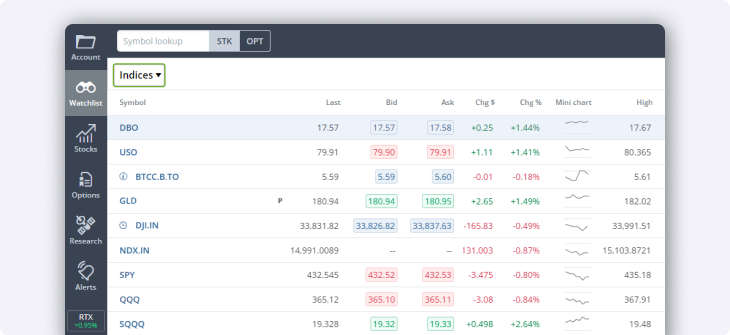
Securities shown are for illustrative, educational, and visual purposes only, and should not be relied upon as financial advice. The information provided is not intended to be and should not be construed as a recommendation, offer, or solicitation to buy or sell.
Creating a watchlist
Log in to your Questrade account on a web browser and head to Questrade Edge Web.
In the main toolbar, select Watchlist.
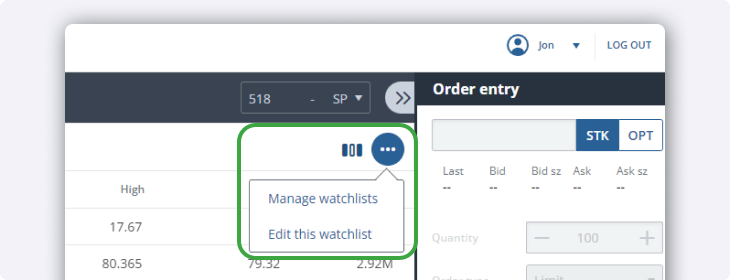
Select the 3 dots on the top right side of the screen, then Manage watchlists.
Create a new watchlist by selecting + Add watchlist.
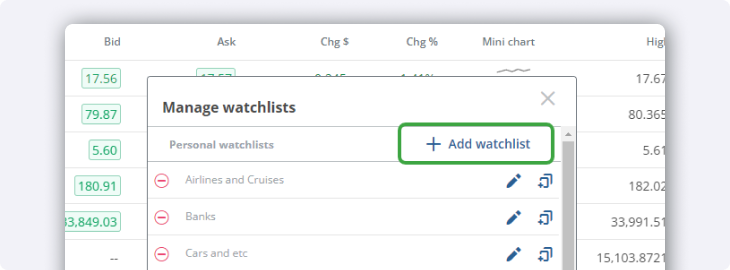
To keep your platform organized, name your watchlist. You can always change this later if you want.
Once the watchlist is created, select + Add Symbol to add securities of your choice.
Editing a watchlist
Later, if you decide to add or remove securities from your watchlist, select the 3 dots and then Edit this watchlist. To add, remove or manage your watchlists, select Manage watchlists.
Watchlists on Questrade Edge Web display key information about the securities you add, including last price, bid, ask, change, mini-charts, high & low of the day, and volume.
However, you can customize the data that appears in your watchlist by selecting the Columns icon on the right-hand side.