Multi-leg options in Edge Desktop
Published: Oct 17, 2022
Updated: Mar 27, 2026
Learn how the Questrade Edge Desktop platform makes multi-leg options trading more straightforward, so that you can more easily work them into your trading strategy.
To place a multi-leg option trade on Questrade trading, please follow the steps below:
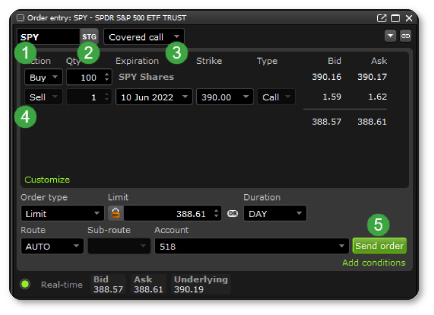
Log into Edge Desktop
In the left corner, click Order entry to place an order
Enter the symbol (1) of the underlying security you’re looking to trade
Change the STK symbol to STG (2) to trade multi-leg option strategies
Choose your option strategy from the drop-down menu (3) or select Custom from the drop-down to customize your own
Enter the details of your trade (4, see below for a breakdown of the order entry window)
Click Send order (5)
Depending on your order entry preferences, an order confirmation window will appear. Review your order and when you’re ready click Send order.
Breakdown of the order entry window:
Leg order details | Description |
|---|---|
Action | Whether the leg will buy or sell the security. If the action would sell a security that they don’t own, the transaction may result in a short sale. |
Qty | Number of option contracts to buy or sell |
Expiration | Date at which an option owner can exercise their right to buy (or sell) shares of the underlying stock |
Strike | Price at which the holder can buy (or sell) the shares if the option is exercised |
Type | The type of option purchased in the leg (typically a Call or Put) |
Transaction order details | Description |
Order type | Select the type of order you want to use. To learn more about the different order types, click here. |
Duration | Select a duration to specify how long the order should remain active. For more information, click here. |