Recurring Investments Guide
Published: Nov 17, 2021
Updated: Dec 12, 2025
What Are Recurring Investments?
Recurring Investments is a Questrade feature that allows you to automatically invest a fixed dollar amount into eligible fractional stocks and ETFs on a schedule you choose. Instead of manually placing buy orders, you can set up automated, commission-free purchases that run monthly, bi-weekly, weekly, or even daily. This helps you build consistent investing habits, stay disciplined through market ups and downs, and reduce the need to constantly watch the market.
Benefits of Recurring Investments
Dollar-cost averagingBy investing the same amount at regular intervals, you automatically buy more shares when prices are lower and fewer when prices are higher. Over time, this helps smooth out market volatility and potentially reduce your average cost per share.
Effortless automationOnce set up, your recurring plan runs automatically. Reducing the need to regularly log in or place manual trades.
Build long-term investing habitsRegular contributions can help support long-term financial goals.
Start with as little as $1Fractional shares let you begin investing with very small amounts.
Zero commissionsRecurring stock and ETF purchases are commission-free (ECN fees may apply).
Reduce emotional decision-makingAutomation helps prevent impulsive reactions to market swings. It’s ideal for long-term goals like retirement planning, education savings, and portfolio growth.
Risks & Considerations
Market orders only
Recurring purchases execute as market orders. The final execution price may differ from the price shown when scheduling your plan, especially during periods of high volatility.
No guaranteed returnsDollar-cost averaging can reduce timing risk, but it doesn’t eliminate investment risk. Your investment value can still go down.
Requires occasional reviewAutomated plans should be reviewed periodically to ensure they still align with your goals and risk tolerance.
How Recurring Investments Work
What accounts and securities are eligible?
Account types: All registered and non-registered accounts are eligible, except Margin accounts.
Eligible securities: All fractional-eligible U.S. stocks and ETFs available on Questrade.
What if I have to convert currency?
If your plan requires U.S. Dollars and you only have the required amount in Canadian dollars (and vice versa), we will automatically convert funds for you.
A 1.5% currency conversion fee applies and is included in the exchange rate used.
Execution
All recurring orders are placed as market orders.
Orders execute during regular market hours on the scheduled date.
If your scheduled date falls on a weekend or market holiday or a day when the market is only partially open, the order will run on the next available trading day.
Execution prices may differ from the price shown when scheduling your plan.
Funding
Orders draw from the available cash balance in your selected account.
If there isn’t enough cash available.
The order is skipped.
You’ll receive a notification.
The plan retries on the next scheduled date.
If two consecutive purchases fail, the plan is automatically cancelled.
Already set to start saving for a comfortable retirement?
How to Set Up Recurring Investments
Recurring Investments can be created on both the Questrade Customer Portal (desktop) and Questrade app.
Set up Recurring Investments from the calendar icon
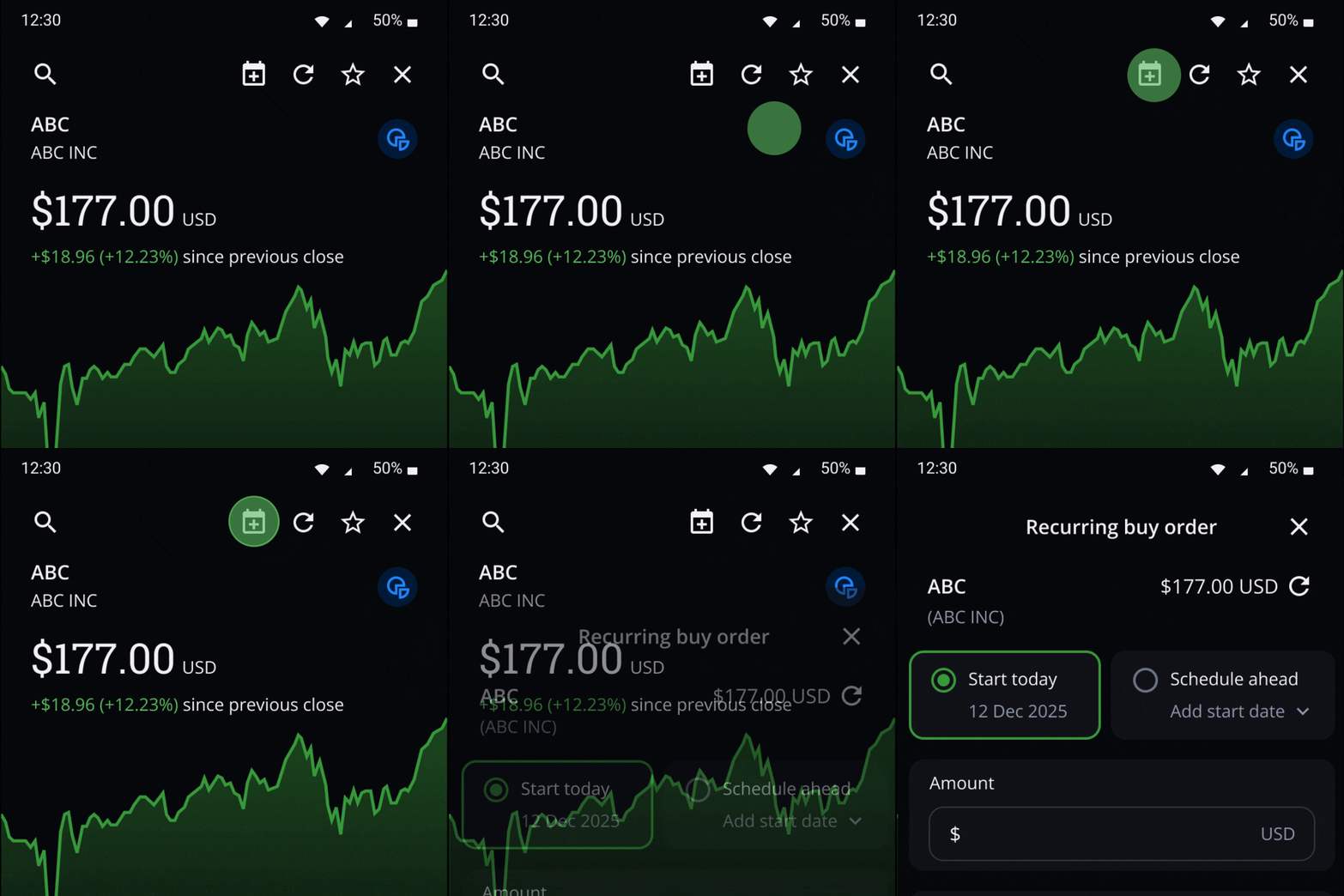
Go to the quote page of the eligible fractionable stock or ETF you want to buy.
Select the calendar icon
Select whether you want to start today or schedule ahead.
Starting today will put an order in immediately if the market is open. Or if the market is closed, will put an order in the next time the market opens.
Enter the dollar amount you want to invest each time.
Select your frequency: daily, weekly, bi-weekly, or monthly.
Pick your end date. The maximum end date (and the default choice) is one year from the current day.
Choose the account you want this recurring order to be set up in.
Review your order, then select Send up recurring order to complete your setup.
Set up Recurring Investments directly from order entry
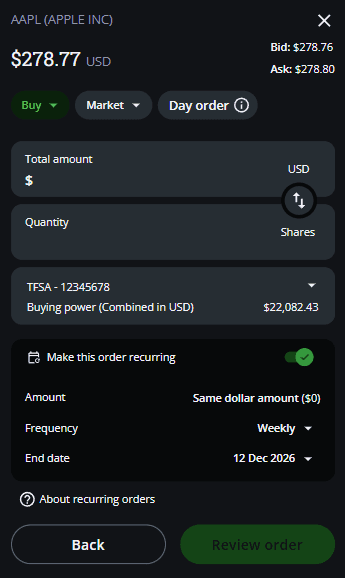
Open the eligible fractionable stock or ETF you want to invest in.
In the order entry window, choose your account and click Buy.
Make sure you have a market order and begin to fill out your order, including total dollar amount or quantity of shares.
Turn on Make this order recurring, it will start today and repeat at your chosen frequency.
Select your frequency: daily, weekly, bi-weekly, or monthly.
Pick your end date. The maximum end date (and the default choice) is one year from the current day.
Review your order, then select Send up recurring order to complete your setup.
Managing Recurring Investments
You can view and manage all your recurring investment plans under Orders > Recurring orders.
From here, you can review key details including:
Next order date
Dollar amount
Frequency
Start date
End date
Modifying a recurring plan
You can update the amount, frequency, start date or end date for any active recurring plan.To modify a plan:
Open the recurring plan you want to update.
Select Modify order.
Update your preferences.
Save your changes. Updates apply to the next scheduled order.
Pausing a recurring plan
If you want to temporarily stop purchases without cancelling the plan:
Open the recurring plan.
Select Pause order.
The plan remains inactive until resumed.
Resuming a recurring plan
When you’re ready to restart a paused plan:
Open the paused plan.
Select Resume order.
Your next order executes on the next eligible date.
Cancelling a recurring plan
If you want to stop all future scheduled purchases:
Open the recurring plan.
Select Cancel order.
Confirm the cancellation.
All future scheduled purchases stop immediately.
Prioritizing recurring orders
If you have multiple recurring investments scheduled for the same day, you can choose the order in which they execute. This means your highest-priority order will go through first when you do not have enough available cash to fill all your orders for the day. To adjust priority
Go to Recurring orders.
Select Prioritize.
Arrange your plans into your preferred order (top = highest priority).
Select Save to apply your changes.
Notifications
You’ll receive alerts when:
You set up a new Recurring Investment plan
Your plan is paused, resumed, modified or canceled
Your plan is about to expire and has expired
An order from your plan filled or failed to fill (in the case where you do not have sufficient funds for the order)