Journaling shares
Published: Oct 17, 2022
Updated: Apr 10, 2026
Learn about this currency conversion technique used by trading pros—and how you can do it for free.
Journaling shares refers to exchanging equivalent, dual-listed shares from different exchanges. When an investment trades on two different exchanges, you’re able to exchange shares from one exchange to another. Typically, this is done with exchanges that use different currencies (the TSX being in CAD and the NYSE being in USD, for example), so by journaling your shares you can also exchange the currency of your asset.
Journaling shares in order to avoid currency conversion fees is commonly referred to as “Norbert’s Gambit”, due to its popularization by Norbert Schlenker, an investment advisor in BC.
At Questrade this process can be done entirely online, and normally costs $9.95/request—unless you have Questrade Plus. By signing up, you’ll unlock unlimited free online journaling requests, letting you perform Norbert’s Gambit as often as you want without any charge.
For example:
‘TD.TO’ shares trade on the Toronto Stock Exchange (TSX) and represent common shares of Toronto-Dominion bank in Canadian dollars.
‘TD’ shares trade on the New York Stock Exchange (NYSE), also representing common shares of Toronto-Dominion bank, however these trade in U.S. Dollars.
Both ‘ticker’ symbols (short form of the company name) represent the same company, and asset, just in different currencies. When this is the case, you are able to ‘Journal’ shares from the CAD ticker to the USD ticker, or vice-versa.
While you may be able to avoid currency exchange fees, you may incur processing fees, settlement delays and potential exchange rate risk while waiting for the journal request to complete.
Please note: There are many different dual-listed investments, ‘TD’ is shown as an example only and should not be taken as any form of investment or trading advice.
Questrade Inc. is unable to provide investment advice or recommendations as an order-execution-only broker.
Placing a Journal request
Follow these steps to journal shares:
1. Log in to your account.
2. Go to the Management page, then click Journal shares.
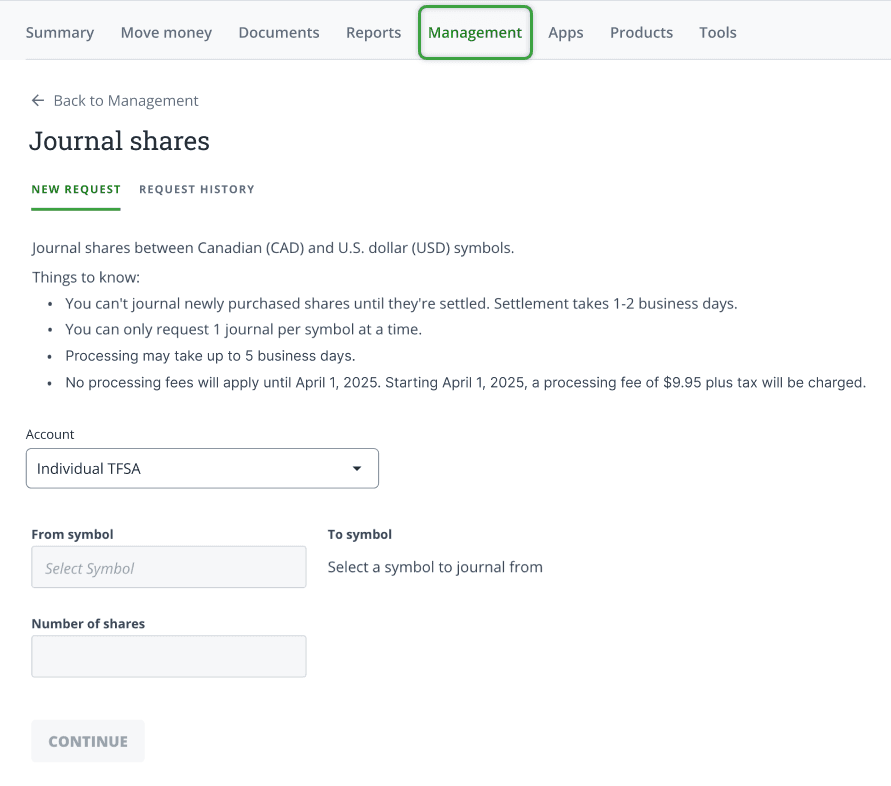
3. Follow the prompts and click Continue to complete your request.
4. To see any of your submitted journal requests, click the Request History tab.
Important to know:
Journaling shares is free with Questrade Plus, but normally costs $9.95/request.
Journal requests may take up to 5 business days to process
If you’re journaling a recently purchased investment, please allow for settlement time which will delay your request by 1 business day from the date of the trade.
For example: You buy shares on Monday, and enter your Journal request the same day. We allow 1 day for the trade to settle (Tuesday), and an additional 1-2 business days for the request itself. (Wednesday/Thursday)
You can only Journal shares of equivalent assets.
If you’ve entered a Journal request, please refrain from trading that specific investment while we’re processing your request.
Once your Journal request has been processed, if you choose to sell the shares and withdraw the funds, you will have to wait an additional 2 day for the new shares to ‘settle’.
Journaling shares is not available for RESP accounts online in your platform. However, you can still take advantage of this feature for your other Questrade accounts. In the meantime, if you need to journal shares in your RESP account, please contact our customer support team through phone or chat for assistance.